Account and billing · Chapter 19
Credits, plans and billing
Vexel is paid in credits: one unit for every model and for the Director. Plans add credits every month, packs top you up, and every job is quoted before it runs. Failed jobs cost nothing.
How a job is chargedLink to How a job is charged
Quote
Before a job runs you see its price in credits, worked out from the provider’s real price for that model and those settings.
Hold
When it starts, the quote plus 10 % is held from your balance. If the balance cannot cover it, the job does not start. A batch is checked as a whole.
Settle
When it finishes it is charged its actual cost, never more than the hold, and the rest returns.
Release
If it fails or you cancel it, the whole hold returns. You never pay for a failed generation.
| Costs credits | Free |
|---|---|
| Video takes, drafts, lip-sync passes and voice-driven takes | Creating and editing projects, scripts, shots and assets |
| Reference images, previz frames, sketches and area fixes | Uploading, importing and approving |
| Voices (scratch VO, cloning), sound effects and music | Song analysis |
| Director turns, the Claude writer and Writers’ Room critics | Renders, masters, exports, stems, Canvas and review links |
Your balanceLink to Your balance
- The credit meter in the sidebar shows your balance out of your plan’s allotment. Top up opens the credit packs.
- Your balance is the sum of every credit movement: grants, purchases, holds, settlements and refunds. Nothing is edited in place; a correction is a new entry.
- Credit history in Billing lists the latest movements: Plan credits, Top-up, Held for job, Job settled, Hold released, Refund and Adjustment.
PlansLink to Plans
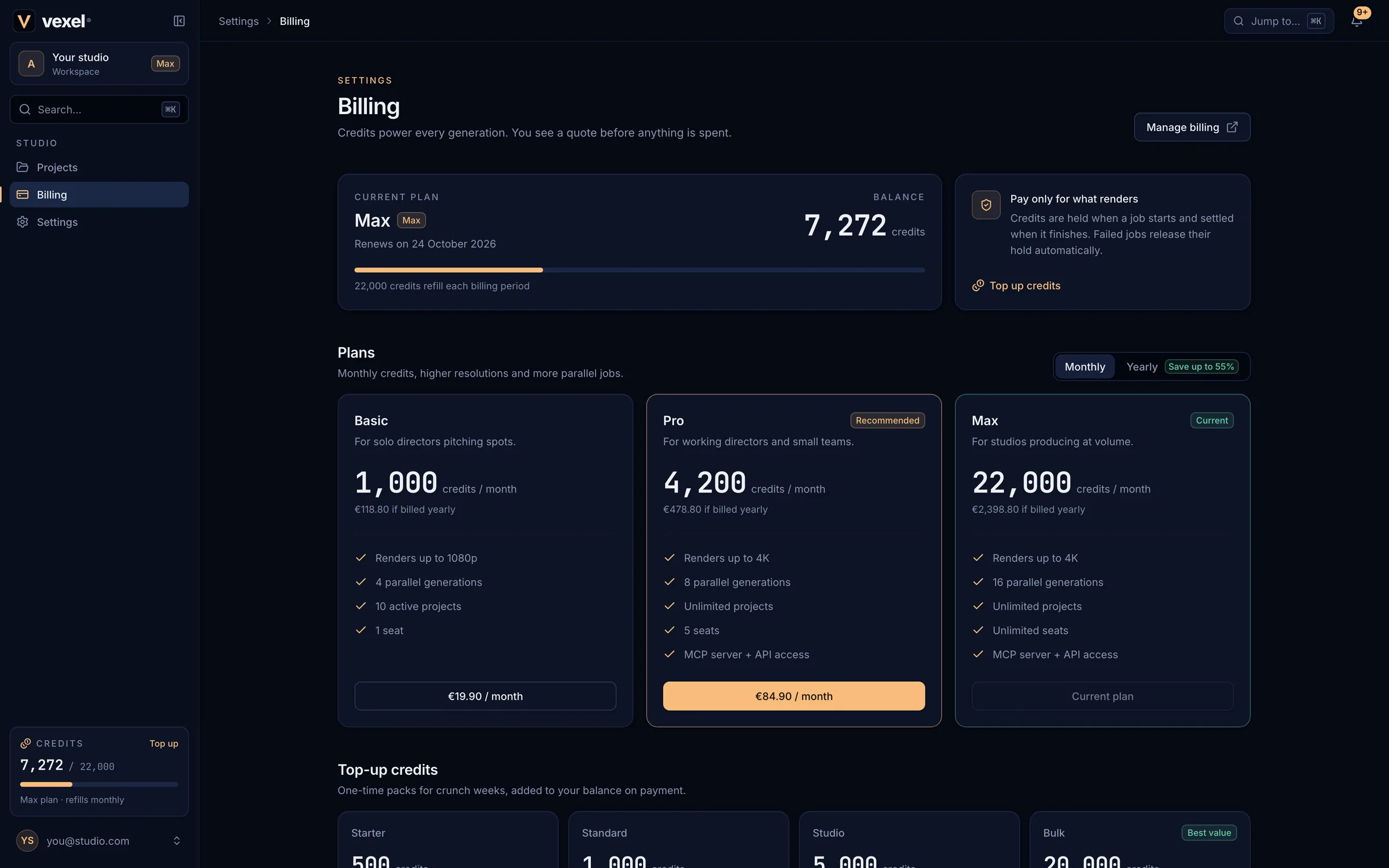
| Plan | Credits | Max resolution | Parallel generations | Projects | Seats |
|---|---|---|---|---|---|
| Free | One-time grant, no card | 720p | 2 | 3 active | 1 |
| Basic | Monthly | 1080p | 4 | 10 active | 1 |
| Pro | Monthly | 4K | 8 | Unlimited | 5 |
| Max | Monthly | 4K | 16 | Unlimited | Unlimited |
| Enterprise | Custom | 4K | Up to 20 | Unlimited | Unlimited |
Current prices and included credits are on the Pricing page. Plans are monthly or yearly; yearly plans cost less and still add their credits month by month. Prices are in euros and include VAT.
Buy a plan or a credit packLink to Buy a plan or a credit pack
Open Billing
Billing in the sidebar (or Top up on the credit meter).
Choose
Pick Monthly or Yearly and the plan’s price button, or a pack under Top-up credits (Buy for €X). Packs work on any plan, including Free.
Pay on Stripe
The secure Stripe checkout asks for your billing address (VAT is worked out from it) and, for businesses, an optional VAT ID. Promotion codes are accepted.
Back in Vexel
You see Payment received. Credits arrive as soon as Stripe confirms the payment, usually within seconds.
Manage your subscriptionLink to Manage your subscription
Manage billing (shown after your first purchase) opens Stripe’s customer portal, where you can:
- download invoices and receipts;
- update your card, billing email, name, address and VAT ID;
- switch plan or interval: upgrades are prorated and invoiced at once, with the matching credits; downgrades take effect at the end of the period;
- cancel: you keep the plan until the end of the period you paid for (Billing shows Cancels on <date>), then the studio moves to Free. Your credits stay.
Payments, refunds and VATLink to Payments, refunds and VAT
- Payments are processed by Stripe; Vexel never sees your card number. Stripe emails a receipt for every payment.
- Prices include VAT. Business customers in the EU can add a VAT ID at checkout for reverse charge.
- If a renewal fails, Stripe retries and emails you; update your card in Manage billing. The plan stays active meanwhile.
- For a refund, open a support ticket. A refund removes the matching share of the credits that payment bought.