Make a film · Chapter 13
Shots and generation
The Shots tab is where boarded shots become video. Every shot sits next to its frame and its takes, the render plan prices the whole board at once, and you pick the take that goes into the cut.
The Shots tabLink to The Shots tab
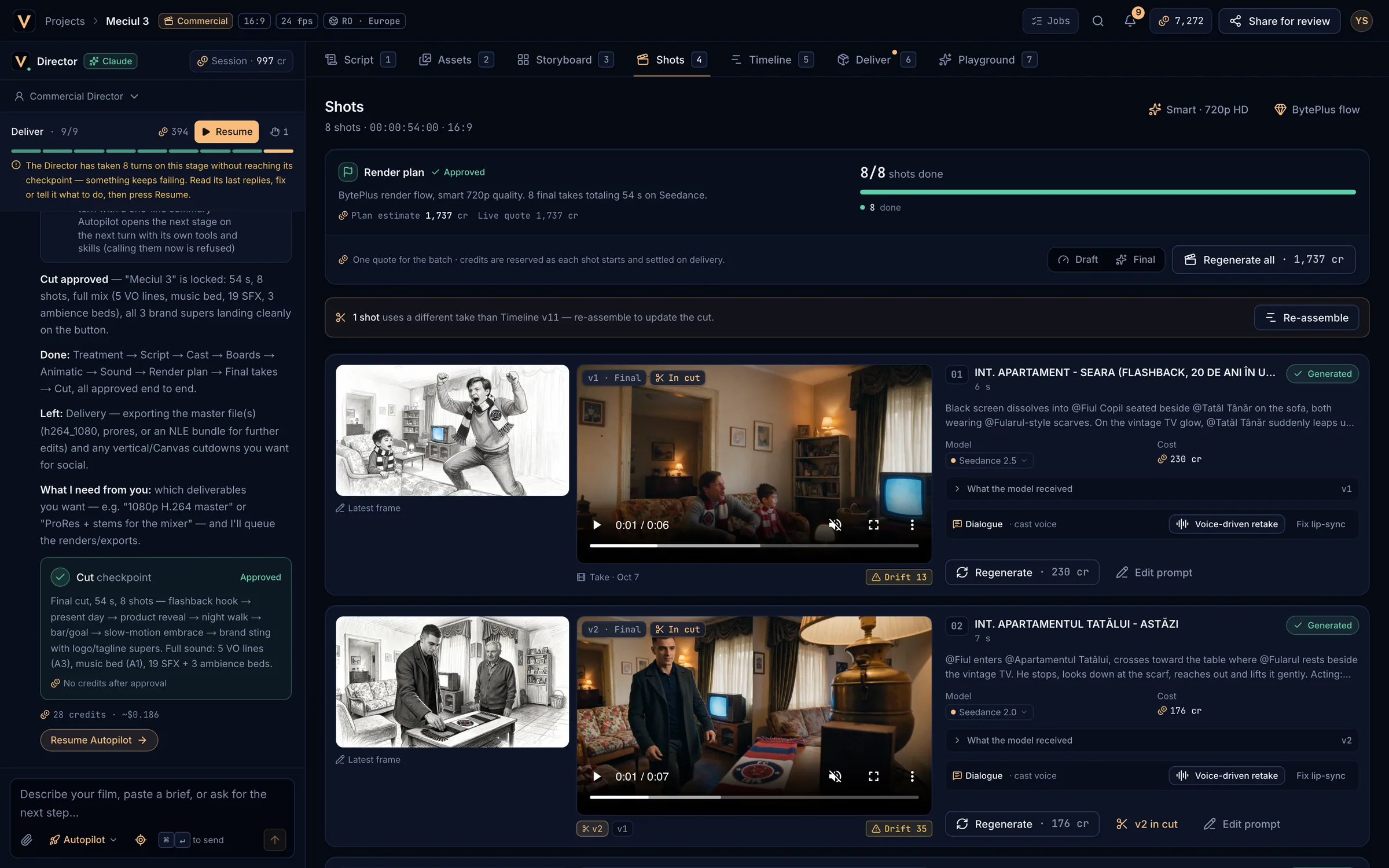
- Render quality and Render flow.
- The render plan: state, estimate and live quote.
- Progress: shots done.
- Draft / Final and Generate all.
- A take differs from the cut: Re-assemble.
- The shot’s frame next to its take.
- Model, cost, what the model received, dialogue and actions.
The render planLink to The render plan
- At the Render plan stage the Director picks a model for every shot and proposes the plan with one quote. Approve plan (or the checkpoint in the Director pane) queues the shots; they land here live.
- Plan estimate is the Director’s figure; Live quote is the price now. + N at generation means some shots are priced when they start.
- The bar shows done, generating, queued, failed, to generate and locked shots, with the time left.
- Generate all (or Generate N remaining, or Regenerate all) sends every shot without a good take in parallel, with one quote and one balance check. Locked and running shots are skipped.
Render quality and flowLink to Render quality and flow
- Render quality (for example Smart · 720p HD): resolution 480p, 720p HD or 1080p Full HD, and the mode Smart (the Director picks Seedance 2.0 or 2.5 per shot), Economy (Seedance 2.0 everywhere) or Premium (Seedance 2.5 everywhere). Your plan’s maximum resolution still applies.
- Render flow: BytePlus (Seedream previz, Seedance takes; best consistency) or Multi-model (Nano Banana Pro previz; Kling 3.0 or Veo 3.1 for shots with people). After switching, re-render the previz frames.
- Changes apply to the next takes and quotes; takes already made keep theirs.
Draft and FinalLink to Draft and Final
Draft renders a cheap preview on the model family’s fast tier at its lowest resolution (Seedance drafts on Seedance 2.0 Mini at 480p; Veo 3.1 on Veo 3.1 Fast). Use it to check motion and blocking before paying for the final. Final (default) renders at full quality. Draft takes are labelled Draft.
A shot rowLink to A shot row
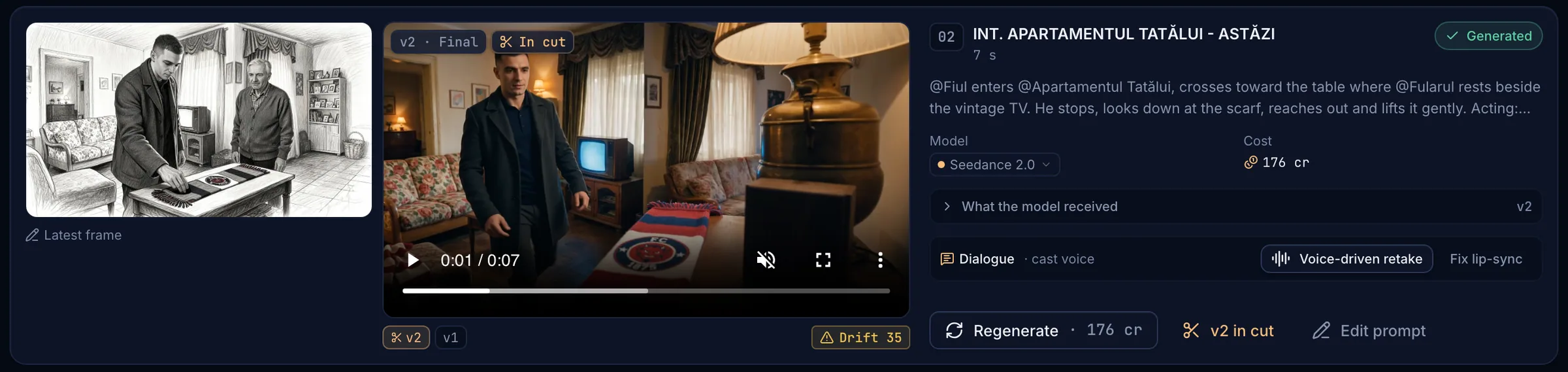
- The take plays muted until you press play. Tags show the version and quality (v2 · Final) and In cut for the take the Timeline uses.
- With two or more takes, the version chips switch between them and Use vN in cut picks the one for the cut. The Timeline updates when you Re-assemble.
- Model: pick another model for this shot (search, with prices). Cost shows the quote and what the shown take cost.
- What the model received shows exactly what was sent: the model, the reference images in order, the previz frame, the prompt and anything left out, with the reason.
- Face badges (Face 91, Drift 68) score the character’s face against the Asset Bible. Check face scores a take that has not been checked.
- Generate, Regenerate or Retry runs the shot again, quoted first. Edit prompt opens the shot editor.
Dialogue and lip-syncLink to Dialogue and lip-sync
- Voice-driven take / retake: renders the shot from the line spoken in the cast voice, so the mouth follows that voice. Use a Seedance 2.x model for dialogue shots.
- Fix lip-sync: the first click prices it (Fix lip-sync · N cr), the second queues it. The synced take arrives as the next version.
- Music videos have a Lip-sync · sung line strip on performance shots: switch it on to lip-sync every new take, or Run lip-sync pass on the take in the cut. See Music videos.
Parallel jobs and queuesLink to Parallel jobs and queues
Your plan sets how many generations run at once: 2 on Free, 4 on Basic, 8 on Pro and 16 on Max. Extra shots wait as Queued · #n. This changes how fast a board renders, never what it costs.
When a take failsLink to When a take fails
A failed shot shows Failed and one sentence saying why. You are never charged for a failed or cancelled job. Common reasons:
| Message | What to do |
|---|---|
| The provider’s safety filter rejected this prompt | Rephrase (no real people, explicit or graphic detail) or swap the reference images. |
| Seedance refused a realistic person in an input image | Switch to the BytePlus flow and re-render previz, or use Render on Kling 3.0. |
| …has no reference image, so final takes are skipped | Generate references for that asset, or run a Draft. |
| This model doesn’t support one of the requested settings | Change the duration, resolution or references, or pick another model. |
| The provider is busy or rate-limiting / took too long | Try again in a few minutes. Recoverable failures are retried automatically. |
| Not enough credits to run this job | Top up, then try again. |
More in Troubleshooting.
Video modelsLink to Video models
| Model | Good for |
|---|---|
| Seedance 2.5 | Best motion and consistency; up to 30 s and 30 reference images; native audio. |
| Seedance 2.0 | The default: great value, up to 15 s and 9 reference images. |
| Seedance 2.0 Fast / Mini | Fast, cheap drafts at 480p and 720p. |
| Kling 3.0 / Kling 3.0 Omni | Realistic people, starts exactly on the previz frame; 1080p with audio. |
| Veo 3.1 / Veo 3.1 Fast | Premium quality up to 4K, 4–8 s shots, native audio. |
| MiniMax H3, Hailuo 2.3, Wan 3.0 | Alternatives with different looks, lengths and reference limits. |
Image models (Seedream 5.0, Nano Banana Pro) draw references and previz frames; ElevenLabs speaks voices, sound effects and music; Sync Labs does lip-sync. The model picker always lists what your studio can use, with live prices.